Your tools, inside Tekmetric.
A floating dock that hovers over every Tekmetric page. AI estimates, call recordings, RO reports, maintenance recommendations, and more — without ever leaving the page you're on.
Always there. Never in the way.
The dock sits at the bottom of every Tekmetric page. It shows the current customer, today's sales, and gives you one-click access to every tool.
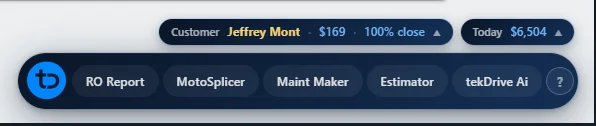
Stop switching tabs. Start closing more.
Service advisors juggle 5-10 browser tabs just to do their job. The TekDrive dock puts everything in one place — right where you already work.
Without the extension
- Switch between tabs for estimates, calls, history
- Copy-paste customer info between tools
- Lose context every time you leave Tekmetric
- No quick access to AI or maintenance data
- Manually look up call recordings
With TekDrive dock
- Every tool in a floating dock on the current page
- Auto-detects the RO, customer, and vehicle
- AI assistant with full repair order context
- Call recordings tied to the current RO
- One-tap estimates pushed straight to Tekmetric
Everything a service advisor needs, in one dock
RO Report
Full repair order context — media, QC findings, tech findings, and call recordings all in one panel.
Estimator
Describe the job, get a complete estimate with parts, labor, and notes. Push to Tekmetric in one tap.
Maint Maker
Generate maintenance recommendations based on vehicle history, mileage, and service intervals.
tekDrive AI
AI assistant with full RO context. Summarize repairs, draft customer updates, prioritize work, answer questions.
MotoSplicer
Visual parts diagrams and component lookup. Tap to select parts and add them to estimates.
Call Recordings
Listen to call recordings tied to the current repair order. Every customer conversation, right in the dock.
Sales Tracker
Daily sales totals, close rates, and advisor performance. Live numbers at the top of the dock.
See it in action
The dock opens panels right inside Tekmetric. Here's what it looks like on a real repair order.
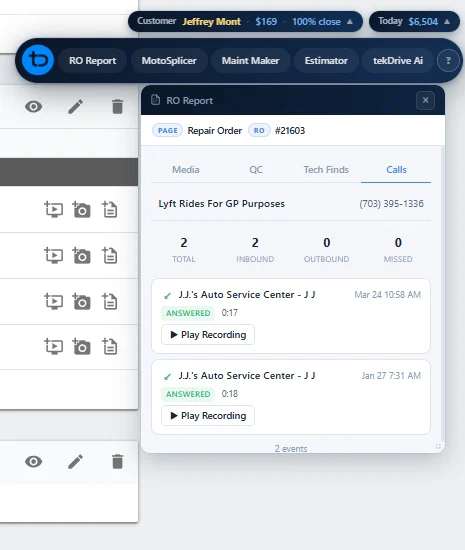
Call Recordings — tied to the current RO
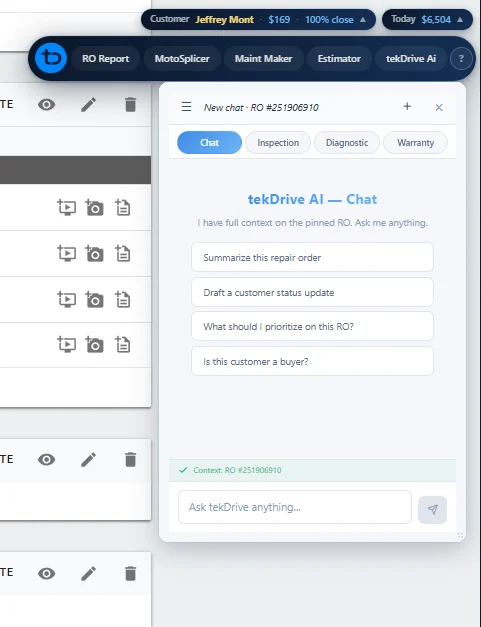
tekDrive AI — full RO context, instant answers
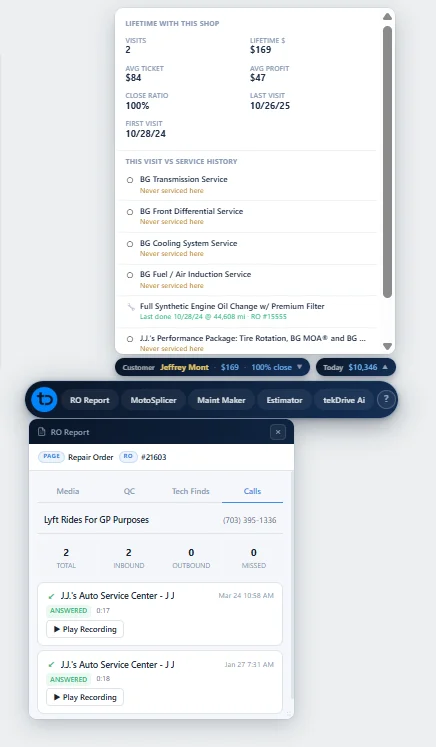
Full Sidebar — customer history and tools
Watch: Create an estimate in seconds
See how easy it is to generate a complete repair estimate using the TekDrive dock — without leaving Tekmetric.
Up and running in under a minute
Subscribe to tekDrive and receive your install link via email
Click the link to add the extension to Chrome
Navigate to shop.tekmetric.com and sign into the dock
Frequently asked questions
Install the extension and navigate to shop.tekmetric.com. A floating dock appears at the bottom of every Tekmetric page with quick-access buttons for each tool. The dock auto-detects which repair order or customer you're viewing and loads relevant data automatically.
Yes. The floating dock hovers over every page on shop.tekmetric.com. It detects the current context — repair order, customer, dashboard — and shows the right tools and data for that page.
The Chrome Extension is included with all tekDrive subscriptions at no additional cost. Install it and sign in with your existing tekDrive account.
Request a demo and we'll walk you through the extension live with your Tekmetric data. You'll see every tool in action on your actual repair orders.
Ready to work faster inside Tekmetric?
Request a demo and we'll show you the dock running on your actual repair orders.